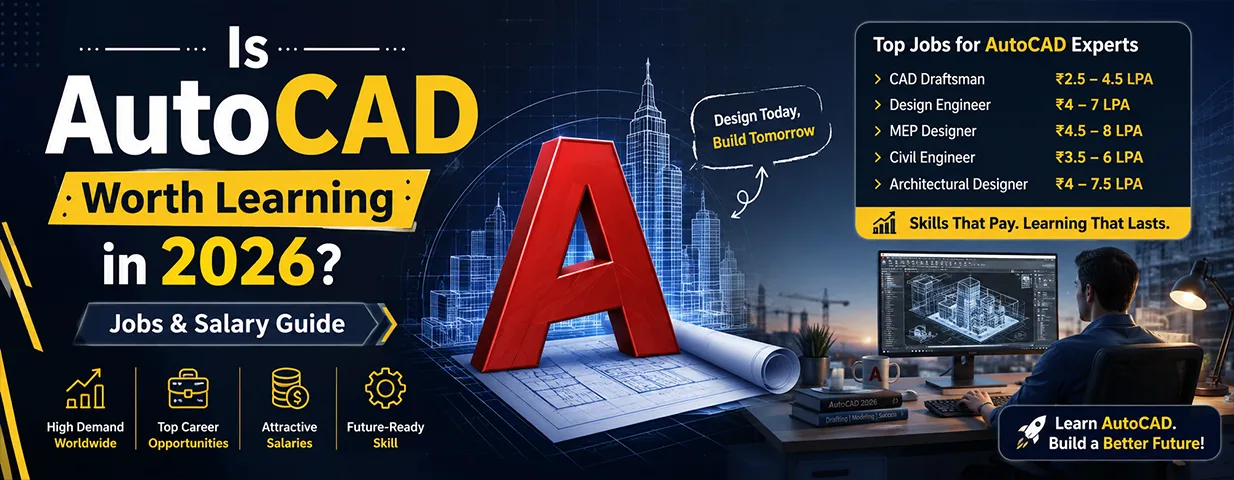
Is AutoCAD Worth Learning in 2026? Jobs, Career Growth & Industry Reality
If you’re considering learning AutoCAD in 2026, you’re probably asking a fair question: is it still a smart investment when BIM, 3D modeling, automation, and AI-assisted design are reshaping how engineers and designers actually work?
Short answer: yes — but not as a standalone career plan. AutoCAD is no longer the only design skill you need, but it remains the foundation nearly every technical drafting and design career is built on. The real opportunity isn’t in mastering AutoCAD in isolation — it’s in understanding where it fits into today’s workflow and combining it with the right specialization. For students and engineering professionals training in Ahmedabad, that distinction matters more than the software itself.
Is AutoCAD Worth Learning in 2026?
Yes — with one condition: don’t treat it as the finish line.
Think of AutoCAD as a foundational skill that leads toward more specialized work — civil design, mechanical drafting, architecture, electrical design, BIM, or manufacturing. The concepts you build while learning it — technical drawing, dimensions, layers, annotations, layouts, drawing standards, and design documentation — carry over directly when you eventually move to more advanced platforms like Revit, SolidWorks, or Autodesk Inventor. For a beginner, that foundation makes everything that comes after noticeably easier.
Why Companies Still Use AutoCAD
Technology changes, but the need for accurate technical documentation doesn’t. Construction companies need plans. Manufacturing companies need production drawings. Engineering consultancies need design documentation contractors can actually build from.
A civil engineer might use AutoCAD for construction drawings, a mechanical professional for component documentation, and an electrical designer for schematics and layouts. The software itself may be only one part of a modern workflow, but the ability to produce accurate, standards-compliant drawings hasn’t gone out of demand — it’s just no longer sufficient on its own.
AutoCAD Career Opportunities: What Actually Comes Next
Your path after learning AutoCAD depends heavily on your background and what you build around it. Common entry points include:
- CAD Designer / CAD Draftsman
- Design Assistant / Junior Design Engineer
- Civil CAD Technician
- Mechanical Drafting Professional
- Architectural Drafter
- Electrical CAD Professional
But real career progression comes from specialization. A civil professional typically moves toward Revit and BIM. A mechanical engineer adds SolidWorks, NX CAD, or product design. Someone leaning toward manufacturing develops CAM and CNC skills. Long-term growth depends less on knowing AutoCAD and more on what you build on top of it.
AutoCAD Jobs in India: What Employers Actually Screen For
Knowing the software’s commands is only the starting point. Employers need people who can take a design requirement and turn it into usable, accurate technical documentation—which takes more than clicking the right tools. A job-ready AutoCAD professional typically understands:
- Engineering drawing principles, dimensions, and tolerances
- Drawing standards and layer/file organization
- 2D drafting techniques and annotation
- How to read and interpret technical drawings
- Practical, real-project workflows — not just tutorial exercises
For freshers, a portfolio of properly prepared drawings tends to matter more in interviews than simply listing “AutoCAD” as a skill.
What Is the AutoCAD Salary in India, Realistically?
There’s no single fixed number. Pay varies by experience, location, engineering discipline, company, project complexity, and — most significantly — by what other software skills you bring to the table.
Freshers typically start at entry-level pay, and professionals with a few years of experience move into more specialized design roles. But the sharpest salary growth tends to come from combining AutoCAD with a second specialization, for example:
- AutoCAD → Revit → BIM → BIM Coordination
- AutoCAD → SolidWorks/NX CAD → Product Design → Mechanical Design
- AutoCAD → CAM → CNC → Manufacturing Design
The lesson isn’t to chase the highest starting salary — it’s to build a skill combination that compounds in value as your experience grows.
Is AutoCAD Still in Demand in 2026?
Yes, but it’s worth being realistic about what that demand looks like. AutoCAD remains relevant because most organizations still need 2D drawings and technical documentation somewhere in their workflow. At the same time, companies are steadily adopting specialized tools for BIM, 3D modeling, analysis, and manufacturing on top of it.
So the real framing isn’t “AutoCAD vs. new technology.” It’s AutoCAD + specialized technology. An engineer who understands both traditional drafting fundamentals and modern digital workflows is simply more versatile than one who knows only a single software platform.
The Future of AutoCAD Careers
AI will likely automate some repetitive drafting tasks over the next few years — that’s a realistic expectation, not a threat to dismiss. But engineering projects still need people who understand design intent, technical standards, constructability, and cross-team coordination. Generating a basic drawing may become increasingly automated; deciding whether that drawing is technically sound, coordinating it with another discipline, and catching a practical design issue before it reaches site still require engineering judgment. The strongest professionals will be the ones who use automation to become more productive, not the ones trying to out-draft it.
Should You Take an AutoCAD Course in Ahmedabad?
If you’re a student, fresher, diploma holder, or working professional moving into design, structured training can meaningfully shorten the path to job-readiness — but choose based on your intended career, not just because a course lists “AutoCAD” in the title. Before enrolling, it’s worth checking:
- Does the course include real, practical project work?
- Will you learn proper drawing standards, not just software shortcuts?
- Does the trainer have actual industry experience?
- Is the curriculum relevant to your specific engineering field?
- Will you finish with work you can put in a portfolio?
- Can you progress toward advanced software afterward?
A CAD training institute in Ahmedabad that connects classroom learning to the kind of work done inside real engineering and design organizations — not just tutorial-style software walkthroughs — makes a measurable difference to how job-ready you are on day one.
AutoCAD vs Advanced CAD Skills: What Should You Learn Next?
You don’t need to abandon AutoCAD when you add something new — build progressively instead:
| Career Direction | Useful Next Step |
| Civil Engineering | Revit, BIM, Structural Design |
| Mechanical Engineering | SolidWorks, NX CAD, Product Design |
| Manufacturing | CAM, CNC, Toolpath Development |
| Architecture | Revit Architecture, 3D Visualization |
| Electrical Design | Electrical CAD, Revit MEP |
| Interior Design | SketchUp, 3ds Max, Lumion |
This gives you a realistic roadmap — one specialization at a time — instead of trying to learn every software package simultaneously.
Where AutoCAD Training Fits at JM CAD
JM CAD has been an Autodesk Authorized Training Center in Ahmedabad since 2012, and AutoCAD forms the core module of its Computer-Aided Design Course in Ahmedabad — covering 2D drafting and 3D drawing fundamentals before extending into SolidWorks, Autodesk Inventor, or SketchUp for part design, assemblies, and rendered portfolio work. Training is built around real design assignments — machine parts, product assemblies, and structural layouts — with faculty who bring experience from large-scale industry projects, plus placement support once you’re job-ready. For engineers with a specific specialization in mind, JM CAD also runs dedicated Civil Engineering, Mechanical Engineering, and Electrical Engineering courses that build on this same AutoCAD foundation.
Frequently Asked Questions
Is AutoCAD worth learning in 2026?
Is AutoCAD still in demand in 2026?
Can I get a job after learning AutoCAD?
Is AutoCAD enough for a long-term career?
What should I learn after AutoCAD?
Final Verdict: Should You Learn AutoCAD in 2026?
Yes — if you learn it with a plan attached. AutoCAD remains relevant, but the strongest career strategy isn’t becoming dependent on one software program; it’s using AutoCAD to build a real understanding of technical design, then specializing based on the industry you actually want to enter.
For a fresher, AutoCAD can be the first step. For an experienced engineer, it can strengthen an existing skill set. And for anyone building a career across Ahmedabad’s engineering, construction, manufacturing, or design sectors, it remains a practical, well-supported entry point into more advanced digital workflows.
The real question was never “will AutoCAD disappear?” It’s “how do I combine AutoCAD with modern skills to become more valuable?” That’s the mindset that turns a basic software skill into a long-term career advantage.
